Speedometer - Odometer App
- 4.4
- Rating
- 1.00M
- Installs
- Free
- Price
 Analysis by App-foxy
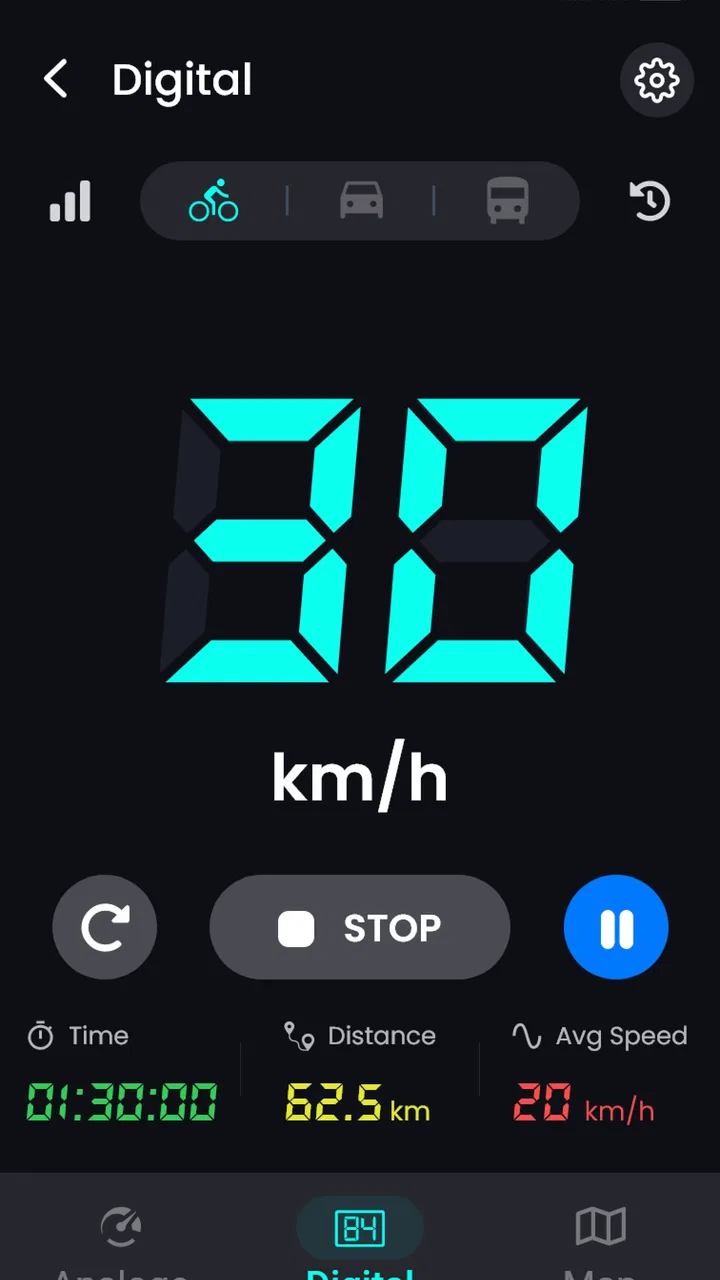
I like Speedometer - Odometer App because it focuses on one practical job instead of trying to replace a full navigation suite. It turns an Android phone into a readable driving display for speed, distance, elapsed time, and route position, with support for both kilometers per hour and miles per hour. That sounds simple, but it is useful when the vehicle’s built-in display is hard to read, unavailable, or not suited to a particular trip.
My overall view is positive, with one important qualification: this is best treated as a convenient travel instrument, not as a professional measuring device or a complete navigation replacement. GPS readings depend on satellite reception, the phone’s placement, and the surrounding environment. Within those limits, the app is a straightforward companion for drivers, cyclists, passengers tracking a journey, and anyone who wants a quick visual record of movement without relying entirely on the vehicle dashboard.
What the app does well in everyday travel
The main appeal is the directness of the experience. You open the app, choose the speed unit that makes sense for your trip, and use the phone as a live speed display. The same session can also show distance and time, while the map gives the journey a geographic context. I find that combination more useful than a speed-only tool because it lets me understand the whole trip rather than glance at one changing number.
You May Also Like

 Blood Strike: 2.5 Anniversary
Blood Strike’s Loadouts Turn Every Drop Into a Tactical Gamble
A close look at Blood Strike’s custom loadouts: how fast access to signature weapons reshapes its battle royale rhythm, rewards preparation, and narrows the gap between fights.

 Pandora - Music & Podcasts
Pandora’s Music Is Easy to Start, but Harder to Recover
Pandora’s strength is its low-effort path from a seed to a station. Its weak spot is how much confidence it asks you to place in connection, setup, and quiet recovery.

 8 Ball Pool
 Is Built on Rivalries, Rematches, and Routine
A close look at the rivalries, rematches, shared routines, and unanswered safety questions that turn a quick pool match into a persistent mobile community.

 Samsung Music
’s Quiet Strength Is Playing What You Already Own
Its reach comes less from spectacle than from dependable access to a personal library. That simplicity is both the app’s strongest retention engine and its ceiling.

 AccuWeather: Weather Radar
AccuWeather Review: A Quick, Clear Forecast for Everyday Decisions
For everyday plans, the best forecast is the one you can understand quickly. AccuWeather makes rain timing, radar, and local conditions easy to act on, with a few trade-offs.

 Hill Climb Racing
Why Hill Climb Racing Still Turns Crashes Into One More Run
A tiny car, a bumpy hill and one more upgrade: Hill Climb Racing keeps resurfacing because its simple chaos makes every near-miss feel personal.
More From Our News Desk



That makes the app particularly handy in situations where the normal dashboard is inconvenient. For example, imagine borrowing a car for a weekend and finding that the speed display is positioned awkwardly or difficult to see from the driver’s seat. Mounted safely in a visible place, the phone can provide a larger, simpler reference. On a bicycle ride, it can offer a quick view of pace and route progress. As a passenger, I can use it to observe the journey without asking the driver to interact with a phone.
The map component is also more useful than it first appears. A speed reading on its own tells me what is happening at one moment, while the mapped route helps me connect that reading with the trip. If I notice that a journey took longer than expected, distance and elapsed time provide immediate context. This is not the same as turn-by-turn guidance, but it is a practical way to keep an eye on movement and travel duration.
GeniusTools Labs has kept the concept accessible. The app belongs to the Maps & Navigation category, yet it does not demand that I learn a complicated planning system before I can use it. That matters for people who want an instrument rather than a collection of route options, saved places, traffic layers, and destination searches.
A useful companion when the dashboard is not enough
One of the strongest use cases is a long drive where I want an independent view of distance and timing. I can start a session at departure, keep the phone positioned securely, and check progress during safe stops. The app’s value here is not that it knows more than a dedicated navigation service; it is that it presents a small set of travel measurements in one place.
I also see a role for it in testing how a vehicle feels on different roads. A driver might compare the apparent pace of a quiet road with the displayed speed, or a cyclist might use the distance and time readings to understand a familiar route. These are simple observations, but having the information visible can make a trip more structured. I would still avoid treating the result as formal evidence for disputes, performance claims, or safety-critical decisions.
The support for km/h and mph is a small but important convenience. Switching between those systems is much easier than mentally converting values, especially when crossing regions or using a vehicle configured differently from the phone. Before setting off, I would check the selected unit rather than assume it is already correct. That one-second check prevents a surprisingly common source of confusion.
Another practical habit is to begin the session only after the phone has a clear view of the sky and the vehicle is stationary. GPS-based tools can need a little time to settle, particularly after being opened indoors or after a long period without location use. Starting early gives the reading a better chance to stabilize before the journey is underway. I would also keep the phone out of direct glare and avoid placing it where its position could become a distraction.
Where it compares well with familiar alternatives
The usual alternative is the vehicle’s own speedometer and trip computer. Those remain better for permanent, glanceable information because they are integrated into the car and do not depend on a phone battery, phone mount, or GPS reception. However, a phone-based display can be more flexible. I can move it between vehicles, use it on a bicycle, or keep it available as a separate reference when the built-in instruments are limited.
A full navigation app is stronger when I need directions, traffic information, destination search, lane guidance, or rerouting. I would choose that kind of app for an unfamiliar city or a time-sensitive appointment. This app makes more sense when I already know where I am going and simply want speed, distance, time, and a map view. Its narrower purpose is an advantage if I find large navigation apps cluttered, but it is a disadvantage if I expect route planning.
Dedicated GPS devices and cycling computers can also be better for repeated training, detailed trip analysis, or specialized outdoor use. They are designed around longer sessions and often provide more focused controls. The phone app wins on convenience: most people already carry a compatible device, and there is no separate instrument to buy or remember. That trade-off is central to deciding whether it fits your needs.
Important limitations before relying on it
The biggest weakness is inherent to GPS speed measurement. The displayed value is an estimate based on location changes, not a direct reading from the vehicle’s wheels. In open surroundings and steady movement, it can be useful. In tunnels, dense urban streets, covered parking areas, or places with obstructed reception, it may become less consistent. I would never use a changing phone reading as a reason to drive faster or as a substitute for obeying posted limits.
Phone placement introduces another layer of friction. A device lying flat in a cup holder may be harder to read, while a loose phone on a seat is unsafe. A proper mount is therefore part of the practical setup, even though the app itself cannot solve that problem. The screen should be positioned so that a brief glance is possible without taking attention away from the road. If I cannot mount it safely, I would skip using it while driving.
Battery use is another consideration during extended journeys. Keeping the screen active and using location can place more demand on a phone than ordinary standby use. I would begin a long trip with a good charge and carry a suitable power source if needed. This is not a reason to reject the app, but it does mean that the phone becomes part of the travel equipment rather than an invisible background tool.
The app’s simplicity can also feel restrictive. It is appealing that the focus stays on speed, distance, time, and the map, but users seeking detailed reports, extensive customization, or a complete navigation workflow may outgrow it quickly. I would not install it expecting a training platform, fleet-management system, or advanced route planner. Its strength is clarity, and clarity sometimes means fewer controls.
There is also a difference between seeing a route on a map and having a saved travel history that can be analyzed later. The app’s central experience is live tracking, so anyone who needs dependable records for work, reimbursement, or formal logging should examine the workflow carefully before making it their only tool. For casual trips and personal awareness, the live display is enough. For documentation, I would prefer an app explicitly built around exportable trip records.
Small workflow choices that improve the experience
I recommend deciding on the unit before moving, checking the phone’s position, and allowing location to settle before treating the first reading as meaningful. These steps are easy to overlook because the app looks simple, yet they have more effect on the experience than repeatedly changing settings while traveling. A quick pre-trip routine keeps the display useful and reduces distraction.
For a passenger monitoring a journey, I would start the app at the actual departure point and note the starting time mentally or in a separate travel note. That makes the elapsed-time display easier to interpret if there is a long stop along the way. A stop at a café, fuel station, or scenic viewpoint can otherwise make the total trip duration look different from the time spent moving. The app can show the session’s travel context, but the user still needs to understand what the numbers represent.
For cycling, I would treat the phone as a supplementary display rather than the sole source of ride information. A handlebar mount, readable screen angle, and conservative glance habits matter more than chasing every small change in speed. On a winding route or rough surface, safety should take priority over checking the display. The app is most helpful when it supports awareness without becoming the focus of the ride.
For a vehicle comparison, I would look at broad patterns rather than expecting identical readings from the phone and dashboard. GPS speed and the car’s speedometer can differ for understandable technical reasons. A consistent difference may be interesting, but it does not automatically indicate that either device is defective. This is one of the less obvious ways to use the app responsibly: as an observation tool, not a calibration authority.
Who will appreciate it most
I think the best audience is people who want a lightweight speed and trip display that works across different kinds of travel. It suits occasional drivers, renters, passengers, cyclists, and users whose vehicle has an inconvenient or limited instrument panel. It is also a reasonable choice for someone who wants a simpler interface than a full navigation application provides.
The app is free to install, which lowers the barrier to trying it for a short trip. It is marked for Everyone, and its current version is 3.1.2 with support beginning at Android 5.0, so it is aimed at a broad range of Android phones rather than only recent hardware. Optional in-app purchases range from $0.99 to $99.99 per item, so I would review any purchase screen carefully and decide whether the basic experience already covers my needs before spending anything.
Its reach is reflected in a 4.4 average from around 13 thousand ratings and more than a million installs. Those figures suggest that the concept has connected with a substantial group of users, but they should not replace personal testing. GPS performance varies by phone, location, mount, and surroundings. I would try it on a familiar route before trusting it as part of a longer journey.
I would skip it if my priority is turn-by-turn navigation, live traffic avoidance, detailed cycling analytics, professional mileage documentation, or a permanent dashboard-quality instrument. In those cases, the vehicle’s equipment, a full navigation service, or a dedicated GPS computer is likely to be a better match. I would also skip it for safety-critical measurement, because no phone-based GPS display should be treated as a certified speed reference.
My final view after using it as a travel instrument
Speedometer - Odometer App succeeds because it understands the value of a focused tool. It brings speed, distance, time, and a map together without forcing me into a full navigation workflow. I like that it can move with me between a car, a bicycle, and a passenger seat, and I appreciate the practical choice between km/h and mph.
Its limitations are equally clear. GPS readings can fluctuate, the phone needs a safe and readable position, long sessions can affect battery life, and the app is not designed to replace directions or specialized trip analysis. None of those issues makes it a poor app; they simply define the boundaries of the experience. The right question is not whether it can do everything, but whether I need a simple travel display.
For that specific purpose, I would recommend it. I would install it for a flexible backup display, a casual journey tracker, or a quick way to observe speed and distance when the usual alternatives are inconvenient. I would prepare it before setting off, keep expectations realistic, and never let the screen compete with safe driving. Used that way, it is a useful, approachable Maps & Navigation app from GeniusTools Labs rather than an overpromised replacement for every instrument in the vehicle.
FAQs for Speedometer - Odometer App
01What is Speedometer - Odometer App used for?
Speedometer - Odometer App turns your Android or iOS device into a digital speed and distance tracker. It can display your current speed while driving, cycling, walking, or traveling, and may record the distance covered during a trip. The app is mainly designed for convenience and reference, helping users monitor movement without relying entirely on a vehicle’s built-in dashboard.
02How accurate is the speed and distance measurement?
The app generally uses your phone’s GPS to estimate speed, distance, and sometimes travel time. Accuracy depends on GPS signal strength, device hardware, weather, buildings, tunnels, and whether the phone has a clear view of the sky. It can be useful for general monitoring, but readings may occasionally fluctuate and should not be treated as a certified replacement for a vehicle’s speedometer or professional measuring equipment.
03Does Speedometer - Odometer App work without an internet connection?
The core speed and distance functions may continue working without mobile data because GPS positioning can operate independently of an internet connection. However, the first location fix may take longer, and features such as maps, advertisements, cloud synchronization, or location-based information may require internet access. Before traveling, it is a good idea to open the app outdoors and allow location access so it can establish a reliable signal.
04Does the app drain the battery or require location permission?
Yes, the app normally requires location permission to calculate speed and distance, and continuous GPS use can consume more battery than ordinary applications. Battery usage varies according to screen brightness, tracking duration, signal quality, and your phone model. For longer journeys, keeping the device connected to a car charger or power bank is recommended, while location access should be limited or disabled when you are no longer using the tracker.
05Is Speedometer - Odometer App safe to use while driving?
The app can be helpful when mounted securely and configured before starting a trip, but it should never distract you from traffic or replace safe driving practices. Do not hold or operate the phone while driving, and avoid changing settings in motion. Use a legal dashboard mount, check local regulations, and remember that the application is an informational tool rather than an officially certified instrument for speed enforcement or vehicle maintenance.
Pros
- Clear real-time speed display for quick glances while driving.
- Trip distance tracking helps monitor individual journeys.
- Supports multiple speed units for different regional preferences.
- Simple interface is easy to use without a long setup process.
- Useful for cycling
- walking
- and other outdoor activities as well as driving.
Cons
- GPS accuracy can drop in tunnels
- dense cities
- or areas with poor signal.
- Continuous GPS use may increase battery consumption on longer trips.
- Distance readings may differ slightly from a vehicle’s built-in odometer.
- Some useful features may be limited behind ads or in-app purchases.
- Requires location permission and may raise privacy concerns for some users.

Speedometer - Odometer App
Gallery